One basket, separate orders for each supplier
A selection of wines can become separate supplier orders. This September release also covers deliveries, bottle locations and offline access.
- supplier orders
- inventory
- pricing
- mobile app

Send one selection to several suppliers
By 29 September, the web app could turn a selection of wines from several suppliers into separate orders. Each supplier received its own email, PDF and order number. Suppliers could answer wine by wine, and you could review their proposed changes on the web or your phone.
On Create Order, the review showed each supplier's subtotal, minimum order and whether an email address was available. Wines without a supplier were left out and stayed selected. Staff could submit the whole selection for approval at once. The automatic approval limit applied to the combined total, while each supplier order remained a separate approval.
On Pending Approval, a manager could approve orders individually or use Approve and send all on the first order in the group. The app reported any orders that did not go out.
A supplier could answer from the link in the order email. Fewer bottles or an out-of-stock answer updated the order immediately, although a full delivery could still be received if it arrived. A proposed price or replacement waited for your decision in Order Follow-up. Once every proposal on an order was decided, the supplier received one email with your answers. The phone app also showed proposals for review.
The current guide image below shows the order review. See the supplier ordering feature for the wider ordering workflow.

Receive bottles before their cost is known
A delivery no longer needed to wait for its purchase price. On the web and phone app, staff could receive bottles without entering a cost. The bottles entered stock at no cost until the supplier provided a price or the invoice arrived. On the web, an owner, admin or manager could find outstanding costs under Needs pricing.
For an order without a known price, the supplier could give a list price and confirm or change the agreed discount. A smaller discount waited for your decision. Uploading an invoice could match it to the order, update the cost and list differences in price or quantity without adding the bottles to stock a second time.
On the web, Download price sheet also let owners, admins and managers fill in missing purchase prices in Excel. Upload prices showed which rows would be applied or skipped before saving.

Give each bottle a place in the rack
The web app gained individual slots in storage units, so different wines on the same shelf could have distinct positions. A slot held one wine at a time. Existing row assignments stayed in place, and occupied slots showed which wine held them.
On the phone, the pin beside a wine's stock locations opened a grid marking its bottles. You could switch between units and see how many bottles had a slot. People who could manage stock could place bottles in the grid; placement remained optional when adding bottles to a unit.
For a unit with a layout, owners, admins and managers could ask Vinius to suggest positions or reorganise the unit. The web app showed the proposed arrangement before it was applied and offered a printable move list. The phone app offered a summary and the same choice to apply the proposal. Large bottles were identified for manual placement.

Check the basis for your bottle prices
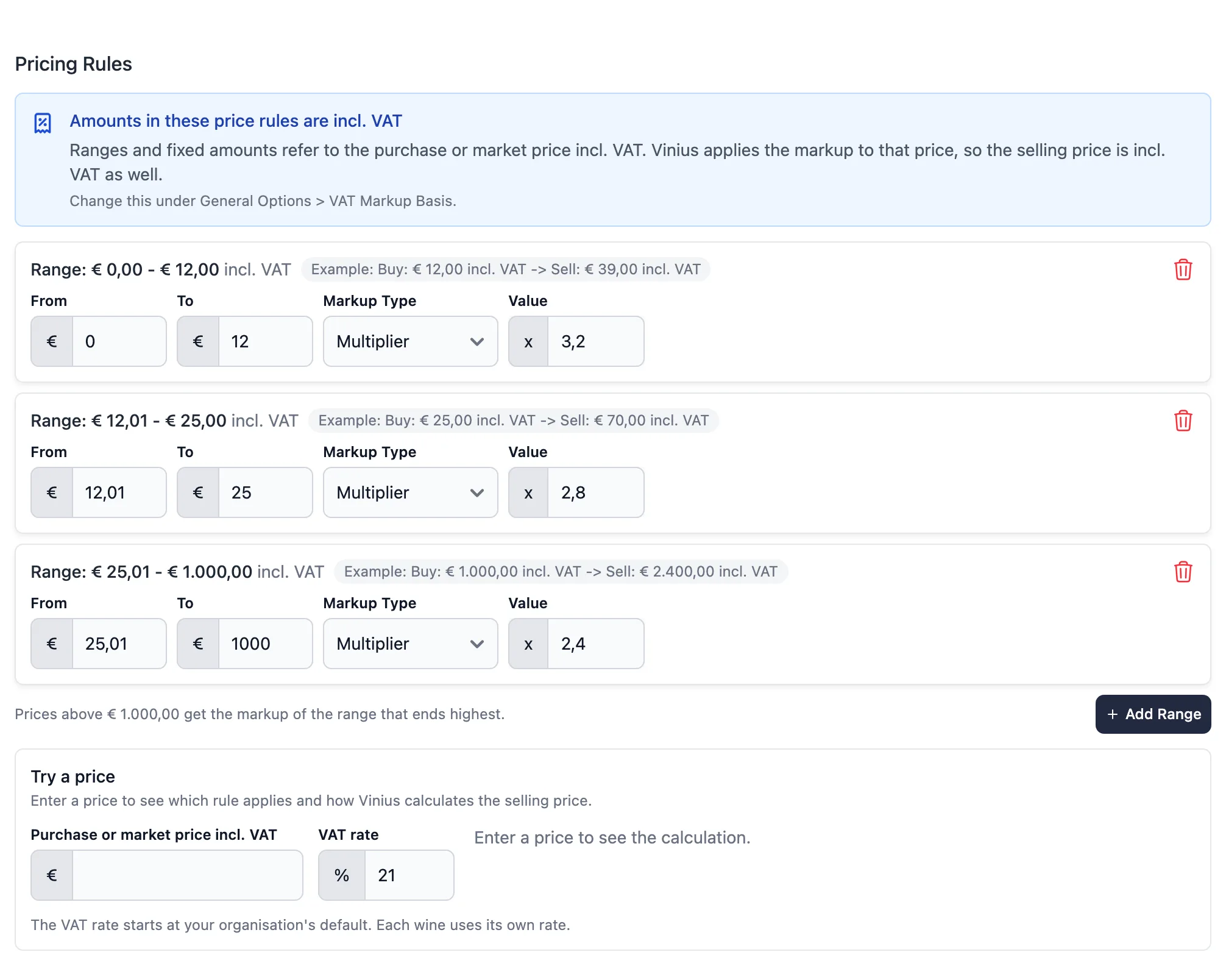
On the web, owners, admins and managers gained a Supplier list price basis in Pricing Rules. The markup could start from the supplier's list price before the negotiated discount, keeping that discount as margin. The wine's Pricing tab showed the list price used and its source. If no list price was known, the purchase price was used instead.
Bottle Pricing also gained Try a price. Enter a purchase or market price to see the rule, markup, VAT and rounding behind the selling price. The VAT rate starts from the organisation default and can be changed for the test.
The page showed whether ranges and fixed amounts included or excluded VAT. It also warned about overlapping ranges and gaps where a price would receive no selling price.
Open your cellar without a connection
The iPhone app began keeping wine lists and wine pages already opened on the device. In a cellar without a signal, you could still look at those saved copies. A note above the list made clear when the counts came from the last sync rather than the current stock.
A page never loaded on that device still needed a connection. Copies older than a week were not used.
The new Offline data screen in Settings showed the saved data, the number of items and the connection status. Clear saved data removed the copies from the device, not the account. You stayed signed in, your site stayed selected and an unfinished digital wine card selection was kept. The next time you opened the cellar, it needed a connection again.
Related insights
Run your wine program with precision, not guesswork
Vinius unifies inventory, pricing, wine cards and reordering in one system, for hospitality teams and serious collectors. Access is by invitation, request yours for founding-member onboarding.