
Wine Clubs
Your members hear it first.
Run a wine club for your guests, regulars or fellow collectors from the same system as your inventory and wine cards. Post news and wine offers at a member price, bring members in by email invitation or QR code, and print member prices on a wine card.

The gap today
- Wine clubs are managed through email threads, WhatsApp groups, and spreadsheets.
- Offering a wine to members means copying its name, vintage and price from the cellar system into an email.
- Member prices are worked out by hand, offer by offer, and the printed wine list only shows the regular price.
- Guests who sign up at a tasting evening end up on a sheet of paper that someone types in later.
- When a sommelier or club manager leaves, the member relationships leave with them.
What changes with Vinius
- The club, its members and its posts live in Vinius, next to your inventory and wine cards.
- A wine offer starts from a wine in your inventory. Members see the member price, with the regular price struck through.
- A wine card linked to the club prints member prices from your own selling prices.
- Guests join by email invitation or, for a public club, by scanning its QR code. You approve the requests, or let the club approve them automatically.
- Staff changes do not break the club; the membership data and history stay with the organisation.
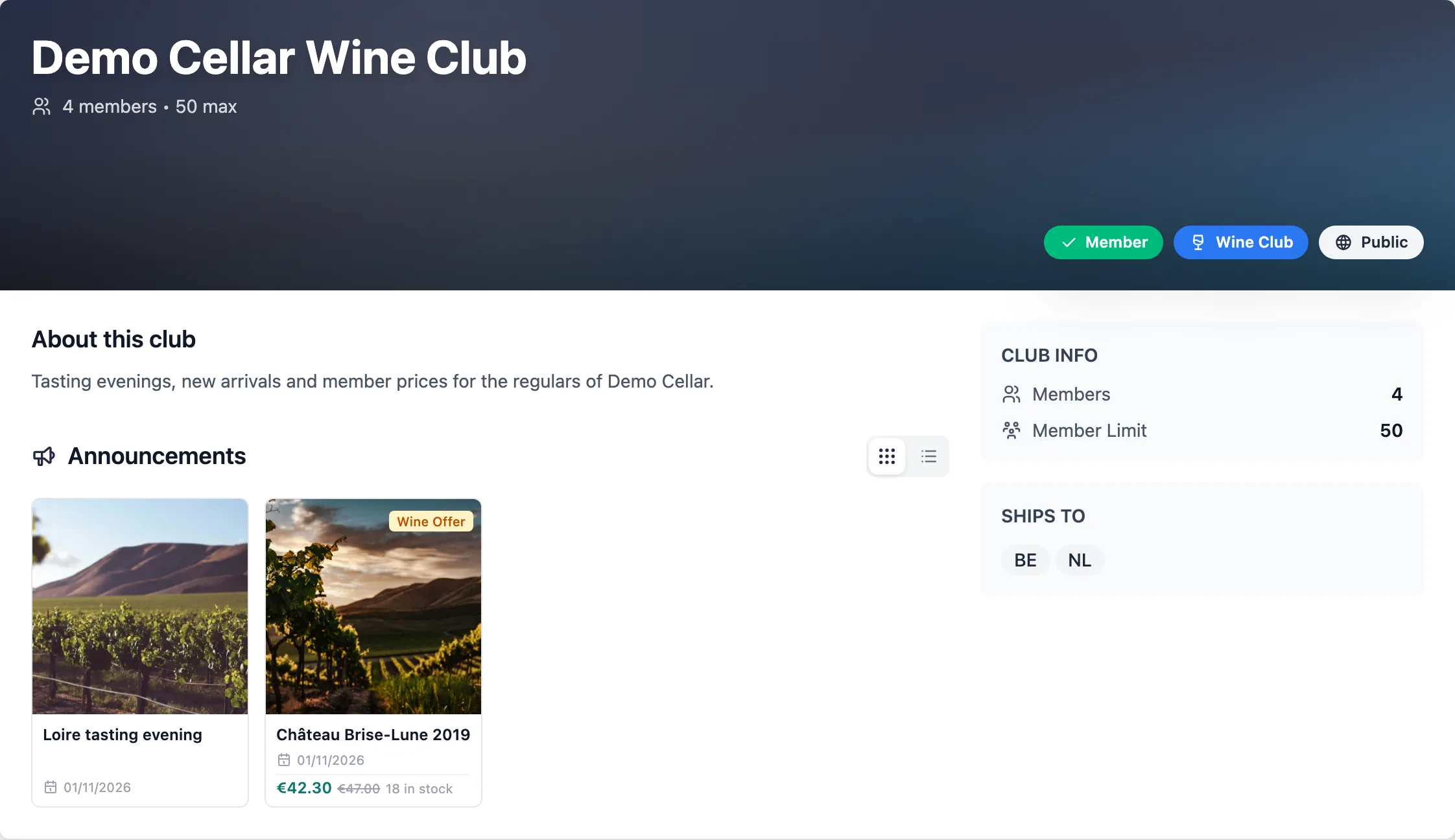
A club's own page, with its announcements and a wine offer at the member price
What's inside
Club management built into the operating system
The club sits in the same system as your cellar. Offers start from the wines you hold, and member prices come from your own selling prices.
Announcements and comments
Post news, a tasting evening or a new arrival to the club feed. Members read it on the web or in the Vinius app, where they can like and comment.
Roles and visibility
The owner, admins and managers run the club, and only they see the member list. A private club takes members by invitation only; a public club is listed under Discover, where people ask to join.
Scheduled and pinned posts
Schedule a post for a date and time, or pin it to the top of the feed. For each post you decide whether it also goes out by email or push, and members decide in their settings what reaches them.
Wine offers at a member price
Pick a wine from your inventory and set the member price, or apply the club's member discount in one click. Members see the regular price struck through and contact you to buy.
Invitations and join requests
Invite members by email, or print a public club's QR code for the bar or the tasting table. Approve each request yourself, or let the club approve requests automatically.
Blind tastings for club evenings
Run a club evening as a blind tasting table in the Vinius app. Each member writes their notes on their own phone and keeps them in their own account.
How it works
One system for the cellar and the club
Create the club
On the web, give the club a name and a description, make it private or public, and set a member limit and a member discount.
Bring members in
Send invitations by email. For a public club, share the join link or print its QR code, then approve requests as they arrive, or let the club approve them for you.
Post news and offers
Write an announcement or a wine offer. Publish it now, schedule it or pin it, and choose whether members also get it by email or push.
Print member prices
Link a wine card to the club. It prints your selling prices minus the member discount, glass prices included, rounded the way your pricing rules round. A club card cannot be made public, so member prices stay with the people you hand it to.
For wine club operators
Run the club from the same system as the cellar
A club on Vinius sits next to the inventory, wine cards and pricing rules of the rest of the programme. A wine offer starts from a wine you hold. A club wine card prints from the same selling prices and rounding rules as your regular card. The member list stays with the club, where the next manager finds it.
- Wine offers picked from the wines in your inventory
- Member prices on club wine cards, from your own selling prices and rounding rules
- Membership data stored with the programme, not in personal email or spreadsheets
- New staff can pick up member relationships without a manual handover
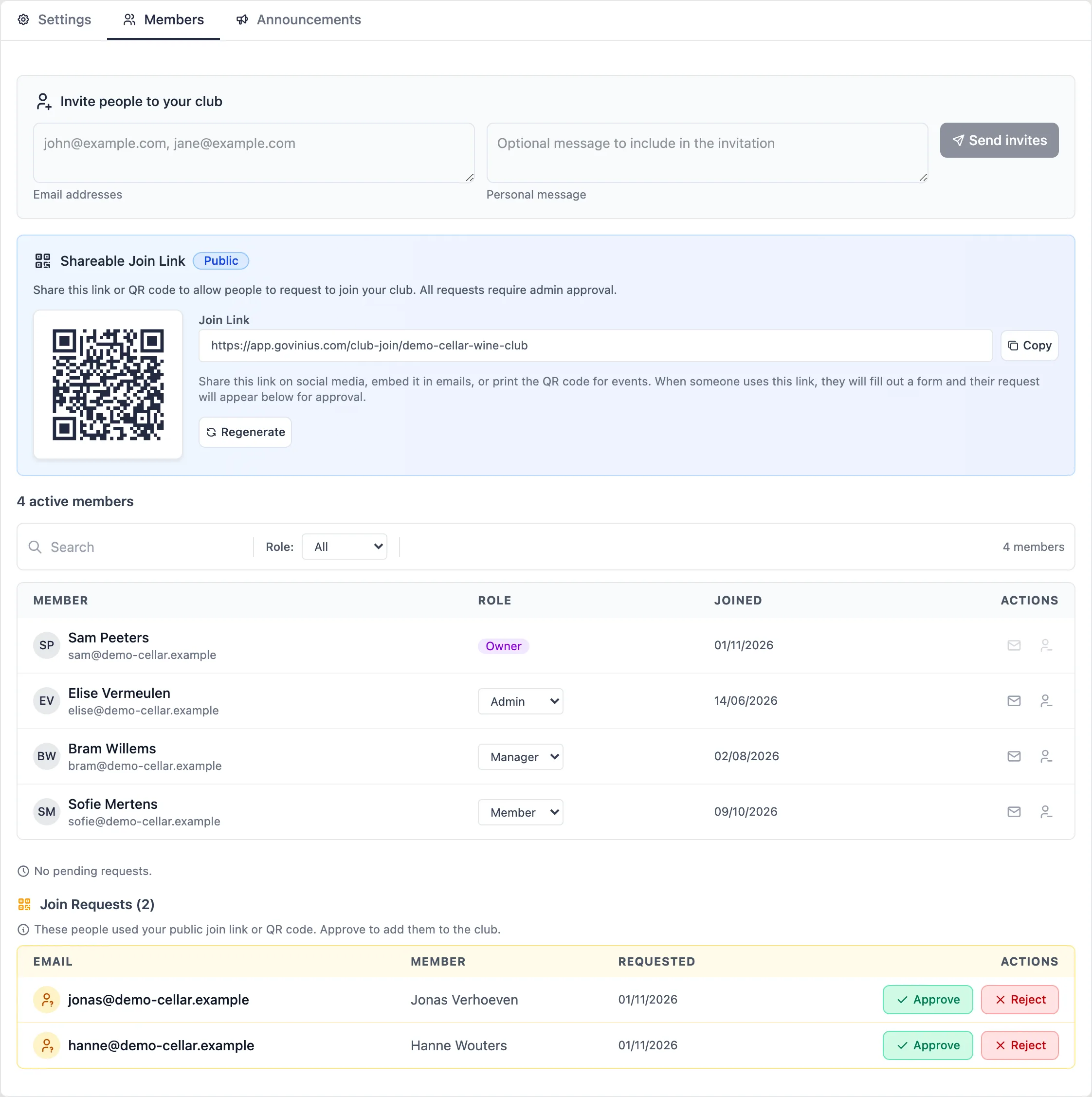
Invitations, a join link and requests to approve, all kept with the club in Vinius
What it changes
Operational outcomes
Industry-typical figures. Actual results depend on the program.
Outcomes & Metrics
| Outcome | Before | With Vinius |
|---|---|---|
| Telling members about a new arrival | A group email or chat message, with the wine retyped each time | One post in the club feed, also sent by email or push when you choose |
| Member data continuity | Breaks when a manager or sommelier leaves | Stays with the organisation as part of the programme record |
| Signing up new members | Names on paper, typed into a mailing list later | A QR code or join link, with each request waiting for your approval |
| Member prices on the wine list | A second price list, kept up to date by hand | Printed from your selling prices on a wine card linked to the club |
Telling members about a new arrival
- Before
- A group email or chat message, with the wine retyped each time
- With Vinius
- One post in the club feed, also sent by email or push when you choose
Member data continuity
- Before
- Breaks when a manager or sommelier leaves
- With Vinius
- Stays with the organisation as part of the programme record
Signing up new members
- Before
- Names on paper, typed into a mailing list later
- With Vinius
- A QR code or join link, with each request waiting for your approval
Member prices on the wine list
- Before
- A second price list, kept up to date by hand
- With Vinius
- Printed from your selling prices on a wine card linked to the club
Run your wine club from the same system as your cellar.
Announcements, wine offers at a member price and the member list, next to your inventory. Request access, accepted by invitation.