
POS Integration
What the POS sold, the cellar knows immediately.
Sales events from your point-of-sale feed directly into lot-level inventory. Stock counts, pour costs, and movement history stay accurate without a separate reconciliation step.
The gap today
- The POS records sales but has no concept of lots, cost basis, or pour volumes.
- Inventory and sales sit in separate systems that staff reconcile manually at week-end.
- A wine can sell out at the bar while the cellar system still shows stock.
- Finance and operations work from different numbers until someone runs a report.
- Discrepancies surface at month-end, when correcting them is most painful.
What changes with Vinius
- Each POS sale event triggers a movement in the corresponding inventory lot.
- Stock counts update in real time, so cellar and floor stay in sync throughout service.
- Pour events link to bottle economics, keeping pour cost visible without extra work.
- Discrepancies surface during service, not at month-end.
- One record of what sold, what was poured, and what remains.
What's inside
Built for the realities of live service
Every capability connects back to the same lot-level data model, so the integration stays accurate even when things get busy.
Real-time depletion
Each sale or pour event triggers an immediate movement in the corresponding lot. Stock counts reflect the floor, not last night's import.
Reliable event processing
Duplicate transactions and out-of-order events are handled gracefully. The inventory record stays accurate even under high-volume service conditions.
Clean data contract
A normalised product structure connects Vinius to your POS via API. Wines map once, then movements flow automatically.
Multi-POS support
The integration layer is designed for environments with more than one POS terminal, more than one venue, or a future ERP connection.
Discrepancy detection
When a sale references a wine that no longer has stock, or a quantity that exceeds what is recorded, the system flags it for review.
Scoped API access
Token-based authentication with role scoping limits what each integration can read and write. Partner access is controlled, not open.
How it works
From first sale to live stock count
Map wines once
Products in your POS are matched to wines in Vinius. The mapping happens at setup; after that, sales flow automatically without re-matching.
Sales trigger movements
Each transaction event creates a movement record against the corresponding lot. The lot's quantity decrements in real time.
Pour costs stay visible
Because movements link to the lot record, pour cost, bottle cost, and depletion sequence are always calculable from the same data.
Discrepancies surface early
Mismatches between POS records and inventory state are flagged during service, not discovered at the end of the month when they are harder to trace.
For hospitality groups
One inventory record across every venue and terminal
Multi-venue operations often have the same wine sold across several sites, each with its own POS. Vinius treats each venue as a separate inventory context so sales at one site deplete that site's stock, while group-level visibility shows the full picture.
- Each venue's POS depletes its own lot-level stock independently
- Group-level view shows aggregate depletion and stock across all sites
- Transfer movements between venues are tracked separately from sales
- A single wine mapped once works across every connected terminal
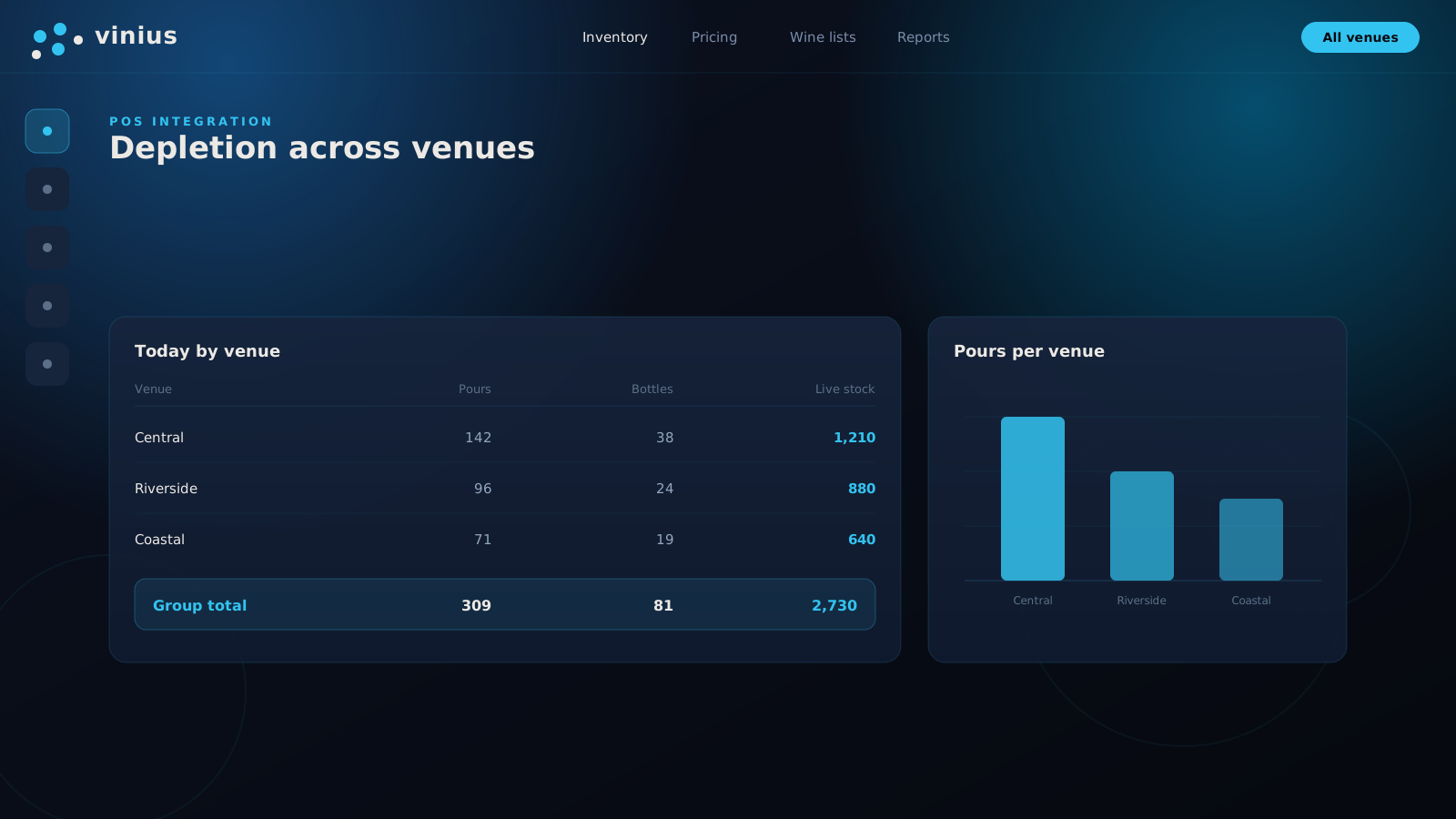
Venue-level depletion feeding a group-level inventory record
What it changes
Operational outcomes
Industry-typical figures. Actual results depend on the program.
Outcomes & Metrics
| Outcome | Before | With Vinius |
|---|---|---|
| Inventory reconciliation | Manual, weekly or monthly | Continuous, event-driven |
| Stock accuracy during service | Lags reality by hours or days | Updates on each sale or pour event |
| Month-end close time | Days spent reconciling POS against cellar records | Shorter when movements are logged throughout the period |
| Discrepancy detection | Found at month-end audit | Flagged during or shortly after service |
Inventory reconciliation
- Before
- Manual, weekly or monthly
- With Vinius
- Continuous, event-driven
Stock accuracy during service
- Before
- Lags reality by hours or days
- With Vinius
- Updates on each sale or pour event
Month-end close time
- Before
- Days spent reconciling POS against cellar records
- With Vinius
- Shorter when movements are logged throughout the period
Discrepancy detection
- Before
- Found at month-end audit
- With Vinius
- Flagged during or shortly after service
Close the gap between what sold and what remains.
Connect your POS to lot-level inventory and keep both systems accurate throughout service. Request access, accepted by invitation.